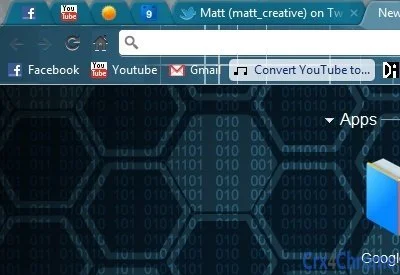

Cyber Space Theme: Hack the Look
Overview
The Cyber Space Theme is a visually immersive browser extension designed to deliver a futuristic, tech-driven aesthetic inspired by cyberpunk and hacker culture. Created by @matt_creative, this theme transforms the browser interface into a dark, neon-lit environment that enhances the sense of digital immersion. It is intended for users who value distinctive visual identity and enjoy expressing their personal style through digital tools. The theme is particularly suited for tech enthusiasts, designers, and individuals drawn to cyberpunk-inspired visuals. While the developer did not provide additional details about the design process or underlying technology, the theme appears to focus on aesthetic transformation rather than functional utility. Real-world usage scenarios include personal browsing, creative workspaces, and online communities where visual identity plays a role. The theme is distributed via a public link on Twitter, suggesting a direct-to-user release model with minimal intermediaries.
Key Features & Capabilities
- Futuristic Dark Interface – The theme applies a deep black background with glowing cyan and magenta accents, mimicking the visual language of sci-fi hacking environments.
- Cyberpunk Aesthetic – Designed to evoke a sense of digital rebellion and technological sophistication, appealing to fans of cyberpunk media and digital art.
- Browser Integration – Seamlessly integrates with supported browsers, altering the appearance of tabs, menus, and toolbars without affecting functionality.
- Minimal System Impact – At 1.5 MB, the theme is lightweight and likely does not consume significant system resources during operation.
- Custom Design by @matt_creative – Created by a known digital artist, offering a unique, handcrafted look not found in generic themes.
Users can apply the theme to personalize their browsing experience, making it ideal for users who want to stand out online. The theme enhances visual engagement without altering browser performance. It is particularly effective in low-light environments where the dark mode reduces eye strain and the neon highlights draw attention to interface elements. The design is static in nature, meaning it does not include animated effects or dynamic interactions, focusing instead on consistent visual cohesion.
User Interface, Workflow & Performance
The Cyber Space Theme modifies the visual layout of the browser interface, replacing default colors and elements with a custom dark palette. Navigation remains unchanged, as the theme does not interfere with core browser functions. Users can apply the theme through a simple installation process, likely involving a direct download and import into the browser’s extension manager. The interface is static, meaning no interactive components are added—users interact with the browser as usual, but with a transformed visual layer. Workflow efficiency is preserved, as the theme does not alter tab management, search bars, or bookmarks. The developer did not specify resource usage details, but given the theme’s small file size and non-functional nature, performance impact is expected to be negligible. Stability is likely high, as the theme does not introduce new processes or background services. CPU and RAM behavior are not documented, but based on standard browser theme behavior, usage remains low.
Compatibility & System Requirements
The Cyber Space Theme is compatible with Windows and Mac operating systems, as specified by the developer. It is designed for use with modern web browsers that support custom themes, though exact browser compatibility was not listed. The installation size is 1.5 MB, which is typical for lightweight browser extensions. The developer did not provide detailed system requirements, including minimum processor speed, RAM, or storage. Exact performance details were not specified. Compatibility information is limited to OS support, and no information was shared about support for older or less common browser versions. Users should ensure their browser supports theme customization to use this product effectively.
Pros and Cons
Pros
- Unique, handcrafted design by a recognized creator
- Lightweight at only 1.5 MB
- Enhances visual appeal with a cyberpunk aesthetic
- Free to download and use
- Minimal impact on system performance
Cons
- No dynamic or animated elements included
- Functionality remains unchanged—no added features
- Compatibility with specific browsers not confirmed
- Developer did not provide technical documentation
- Theme is purely cosmetic, offering no utility beyond appearance
FAQ Section
Is the Cyber Space Theme safe to install?
The theme is distributed through a public social media link. As it is a browser theme with no executable code, it poses minimal risk. However, users should only download from the official source provided by @matt_creative.
Can I use this theme on both Windows and Mac?
Yes, the theme is compatible with both Windows and Mac operating systems as stated by the developer.
Does the theme require an internet connection to work?
No, once installed, the theme functions entirely offline. It does not require an active internet connection to maintain its appearance.
How often are updates released?
Update frequency was not specified by the developer. Users should check the original source for any new versions.
Is this theme free to use?
Yes, the Cyber Space Theme is available at no cost. There are no hidden fees or subscription models.
Final Thoughts
The Cyber Space Theme delivers a bold, immersive visual experience tailored for users who want to elevate their browser’s appearance with a cyberpunk-inspired design. While it does not offer functional enhancements, its aesthetic value is significant, especially for fans of tech culture and digital art. The lightweight nature and free availability make it accessible to a broad audience. It is ideal for individuals seeking a distinctive look without compromising system performance. The theme’s minimalist approach ensures stability and compatibility across supported platforms. For those who enjoy personalizing their digital environment, this is a compelling choice. Download the Cyber Space Theme now.







